KawmHmoob Development Blog 9/10 | Reading, Speaking Module Audio, and Additional QoL Features
Devan Lee
Introduction
Today is September 9th, 2026, and today I've successfully implemented the first iteration of the reading module section for my Hmong Language Learning app, KawmHmoob.
In this blog, I will cover the scaffolding I planned for this section of the app, the steps I took to implement the feature, the tweaking, and finalization.
For the longest time I wanted to implement a reading feature in the app that would help users with reading Hmong, and even help with adding new Hmong words to their vocabulary.
In my Hmong app, I envisioned that the app would consist of 4 specific modules for mastering the language:
- Learning
- Speaking
- Vocabulary
- Alphabet
As mentioned in my other blogs;
The learning module is reserved to teaching the Hmong linguistic concepts,
The speaking module is reserved for helping the users with pronunciation of Hmong words, and phrases.
The vocabulary module is broken up into multiple different sections;
Writing - Reserved for writing in Hmong- Reading - Reserved for reading in Hmong
- Vocabulary - Reserved for learning Hmong Vocabulary words.
And finally the Reference / Alphabet section would be strictly for the Hmong alphabet, and access to the Hmong dictionary.
Since I had already completed the writing, and the majority of the vocabulary logic, I was keen on starting on the next major implementation: Reading module.
Status of the App
So far, with the introduction of the reading module for the app, the completion of the app is currently at 75%.
I still need to propagate the speech module with at least 20 speaking lessons, author about 5 new stories, and complete the reading module (I have only completed a first part for it.)
My main goal is to firstly complete the pronunciation recordings, and annotation for the leftover words within the app's dictionary, and additionally implement the audio for the speaking lessons.
Which wouldn't be so difficult, but the only problem is that I'm not the best Hmong speaker myself, so I will try not to be so shit with the pronunciations like last time :tired_eyes: .
Afterwards, I would need to finalize the testing for the reading module, and propogate it with 2 cultural stories, 2 history stories, 2 Hmong stories, and 2 celebrity autobiographies.
I would also need to add relevant lessons for the writing module, but for now, I want to focus on implementing better more complex sentences for the writing module.
That's not even close to what I imagine the app would need even more.
But with all of this content implemented, I will feel comfortable enough to release it to the Play store, and charge a $7.99 monthly subscription for it.
Reading Module
The reading module for the app is something I'm excited to share about!!
This was always one of the biggest features that I was very interested in implementing from the very beginning.
One the main reasons why I wanted to implement this module originates from my own experience in learning how to read Hmong: I wanted culturally relevant reading content to read in Hmong, that was intermediate-level friendly, and introduced me to accurate Hmong grammar structure, and expanded my Hmong vocabulary.
The best way to exercise the human mind when learning something is to feed it challenges so you can practice critical thinking, and so your brain can adapt the learnt concepts into something it can piece together.
The problem with Hmong reading, is that it's very difficult to find culturally relevant Hmong readings to read, and especially find Hmong readings about relevant topics.
Additionally, whenever I read something in Hmong, there was always new words that I didn't know prior, and so I would always have to manually translate any new word I found and add it directly to my vocabulary - and this is what inspired my concept for the reading module.
Learning new words when reading Hmong stories, to me, was, is, extremely fun - but one of the things I hated about learning the new words was having to take the word itself, and definite it independently using third party recourses.
Because of this problem, I knew I needed to add a feature that would automate a resolution for this issue.
But firstly, let me explain the structure of the module: I wanted to create a reading module that consisted of multiple different stories relevant to Hmong culture, Hmong history, Hmong icons, and Hmong politics, each with a specific reading level, and genre so that learners can learn how to read Hmong while also learning more about Hmong in general!
Then whenever a user would read through a story, if they were to find any word(s) that they didn't recognize in their current vocabulary, they would have an easy way to define the word directly, and learn it whenever it appeared - that way they can see how a specific Hmong word works in Hmong writing, how it's defined, and how it's pronounced.
My idea was: User sees a word within a sentence while reading -> long tap and hold the specific word -> dictionary modal of the specific word, along with it's definition, use in a sentence, and pronunciation.
Then within that dictionary modal, the user would have the ability to add the word to their personal note book so they could practice reading, and writing independently to better understand that specific word.
All within the app.
It sure beats my method, which was a google doc for every Hmong word I found that I didn't know, then using ai to translate the specific word, and then using Quizlet to study the word.
Additionally, for every line within the app, the user would be able to tap, and see the sentence in Hmong vs the sentence in English - and they would also have the option to turn off this feature in the settings.
Finally, there would also be a comprehensive quiz at then end so that users can get quizzed about relevant facts related to the story and test themselves on if they were able to comprehend correctly.
----
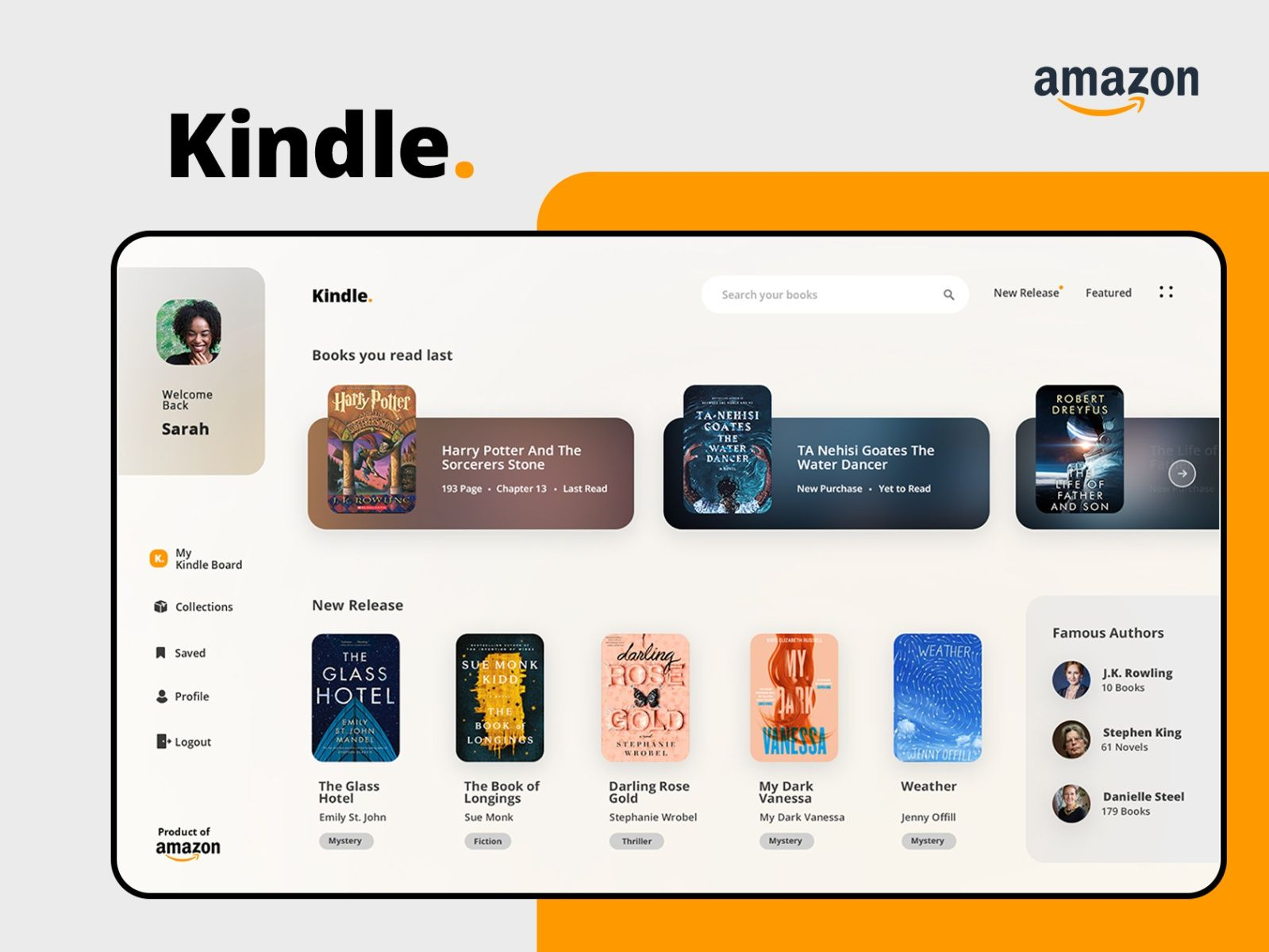
The vision I scaffolded for the original implementation of the module's layout took a lot of inspiration from Amazon kindle, and coincidentally, amazon kindle also had a feature where users were able to look up a specific word within a story they're reading and see it's definition but just not as complex as mine.
Anyways, however, the app's reading module took inspiration from Amazon Kindle's story layout:
Here is a reference photo:
Anyways,
I wanted the structure to be similar to that- and I envisioned that when users entered the module, that they would see a library of different stories each separated by genre, with a swipe-able horizontal scrollview that contains the different stories for users to choose from, and within those stories it would include the stories' cover art, followed underneath by the title of the story.
The layout would separate everything by genre, so imagine:
Genres:
Everyday Life
Horror
Romance
History
---
Something akin to that- maybe that's a shitty explanation, sure but I will get on it, don't you worry, and provide a visual example, just let me finish explaining.
Then the user could also access another tabbed page dedicated for a specific genre which would contain all stories relevant to that specific genre.
Anyways, for the programming infrastructure I envisioned, I envisioned that each story would be it's own independent tab layout for a specific story - but that each written story (the story itself ) would originate from a javascript array containing that information.
For the reading page index itself, it is just one giant single source of truth, but each story directly would be tabbed so when users accessed a story, they would be transferred to a unique page dedicated for that specifc story.
This was way better than create a page for every story, because I imagine the final app would have like 50+ different stories.
Then within the index, I would have to layout each of those stories onto the page so that everything is presented nicely and looks good, while also following the layout I envisioned.
This meant that I would have to create an object of arrays for the story, connect that with the data, create maybe 2-3 new components for the story books themselves, adjust the index reading page so everything combines together cohesively.
Wow, that was a terrible explanation.
Basically:
Every file within in my app "app/" is a URL — that's expo-router. The folder path is the address.
app/reading/index.jsx — /reading — the library. The shelf view. One horizontal row per genre, each row a strip of book covers you scroll sideways. It's deliberately not a vertical list: at 25 stories a list is a scroll marathon, but shelves fit three or four genres on one screen. It builds its own frame instead of using TabScreen so the shelves can break out past the page gutter.
app/reading/[genreId].jsx — /reading/life — **one shelf, opened up.**The same covers, but in a grid instead of a strip, so you can see all of a genre at once. The square brackets in the filename are the whole mechanism: [genreId].jsx means the URL segment arrives in the component as genreId. Rename the file and you rename the parameter — nothing else connects them. The tabbed layout.
The shared component
src/components/reading/StoryCover.jsx — one book jacket, drawn once.It exists as a shared file specifically because the library and the genre screen were drawing the same object differently — tapping a cover landed you on something that looked like a settings list. The ratio (1:1.42, roughly a paperback) is what makes a coloured rectangle read as a book before any artwork exists.
The data
src/data/stories.js — genres + every story. This is the one file adding a story should touch. A story carries id, title, genre, level, minutes, paragraphs (array of paragraphs, each an array of {hmong, english} sentence pairs), glossary, and questions. Genre membership is derived — a shelf holds whichever stories claim its id, so writing the story is the only step. Free/Pro is one word: free: true on a genre.
This is where all the authored stories originate from.
And finally for the comprehensive quiz logic, and word identification it was a bit difficult,
I had to create a completely new engine that takes a predetermined set of questions and answers relevant to a story and combine that , and then connect it to the user's current progress on if they got questions wrong or right, and save everything.
Additionally within the stories page itself, for the vocabulary identification logic, I would need to identify each specific word within my own vocabulary database, and then return the word for the modal to use.
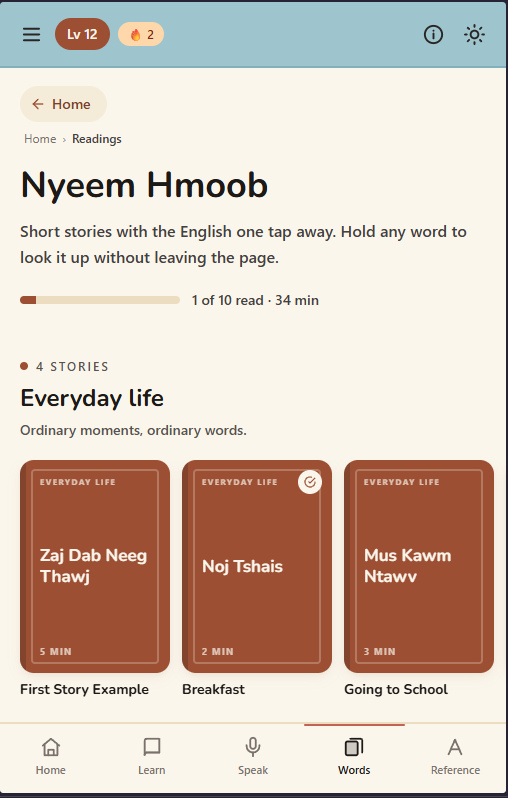
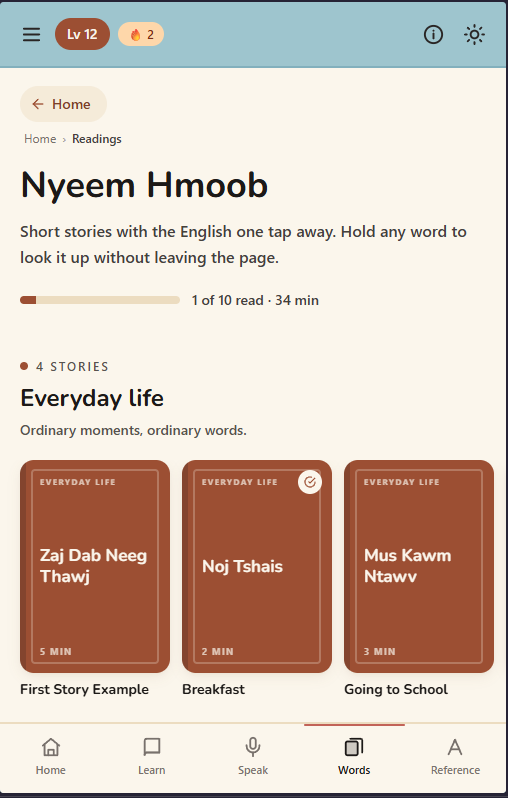
Anyways, after wiring all of that combined together, here is the UI I made:
Layout for the landing page of the reading module.
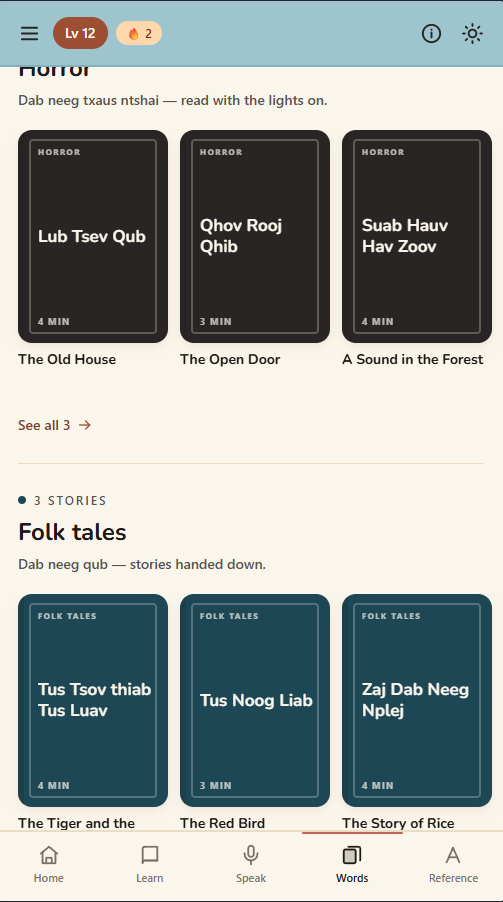
Layout for the different genres:
Layout for the stories (note this is just a placeholder - in the future I envision it will contain the art for the stories):
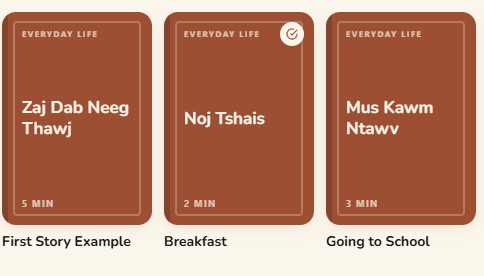
Note, It's level, Hmong title, then time to read, followed by English title.
Layout for the genres stories:
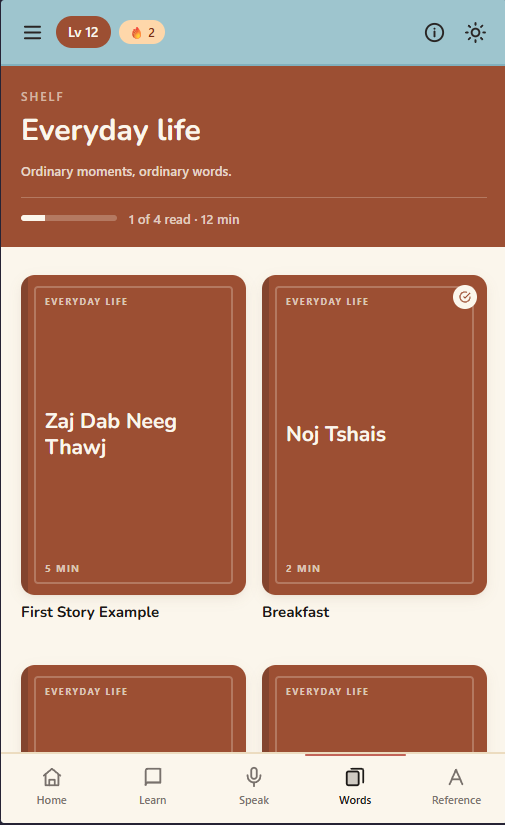
Layout for the stories itself,
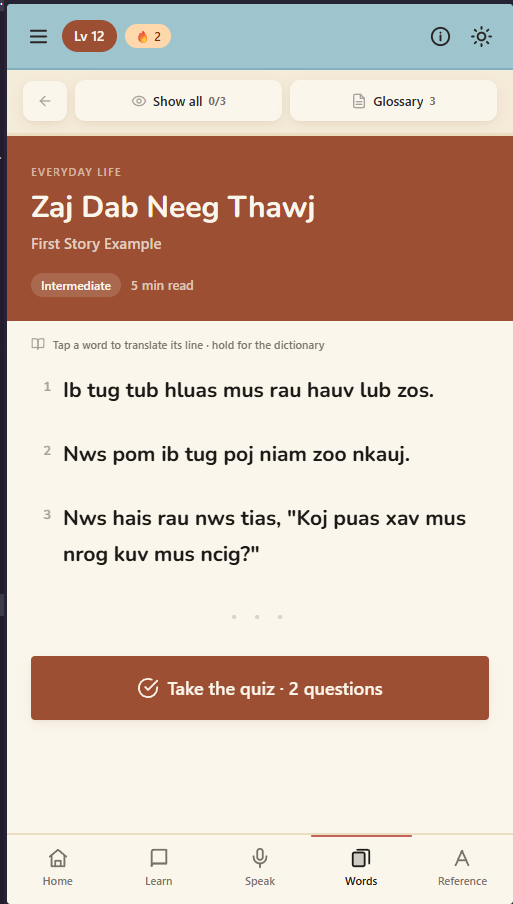
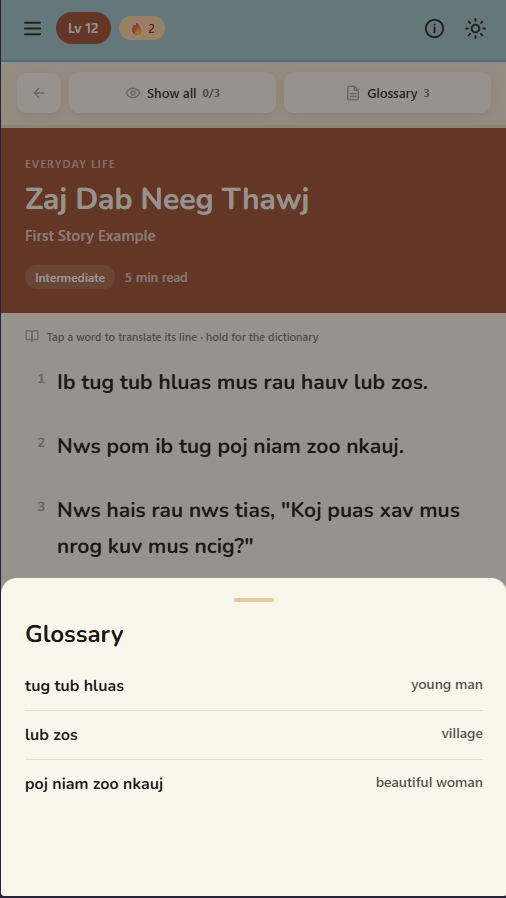
Layout for the translation
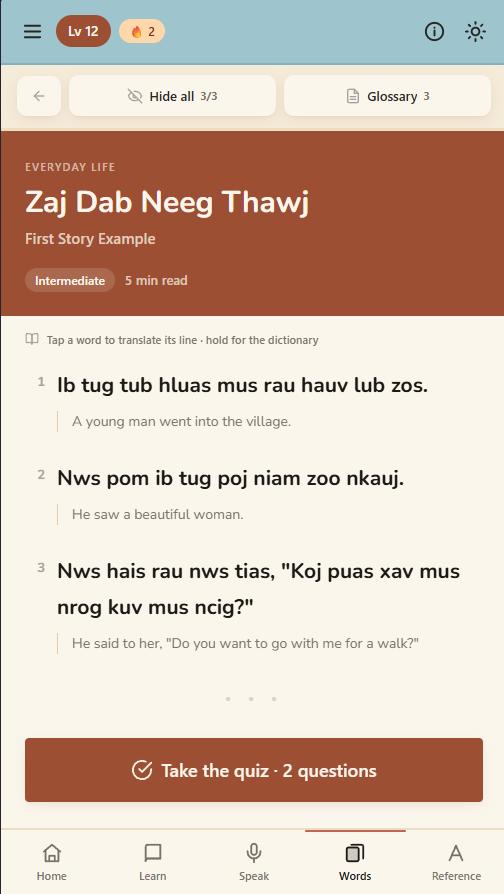
Layout for the quiz
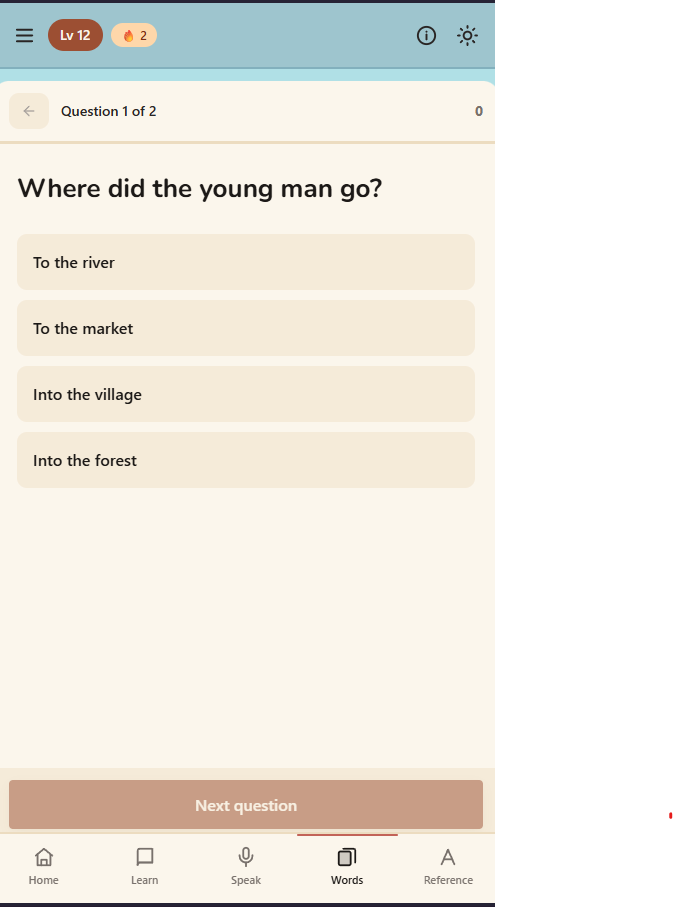
I couldn't get access to the dictionary lookup modal for the vocabulary press logic I explained earlier, because unfortunately, i couldn't access it through the current iteration of the webapp, but luckily, it works on the mobile development build.
Next steps.
For the next steps, I plan on propagating the reading with multiple stories, at an intermediate reading level, about multiple things related to the Hmong community.
Ideally, I was looking forward to:
- 2 stories about Hmong-American history
- 2 stories about Hmong-American celebrities (biographies)
- 2 stories about Hmong Culture
- 2 cool things invented by Hmong people.
Each with about 5 paragraphs in them.
I love love love researching and documenting shit like that, so this will be like another passion project atop of another passion project, learning about Hmong things, writing in Hmong, and publishing these Hmong excerpts.
Yes, I plan on writing everything in Hmong, all by myself. Teehee.
I also need to add a sorting logic in the readings page so that users can sort stories by genre, and reading level.
Programming Concepts Learned
As for programming concepts learned, everything here was actually very basic;
Create a new index specifically for the reading, then new tabs for the stories themselves, and genre.
Connect it all together.
Create an engine for the quiz, and for the vocabulary look up, and configure it to the stories.
Configure the readings page to contain and sort the stories by genre, and level.
Create a new component for the Stories cover UI.
Nothing really new, just basic react and JavaScript.
To Do List
The next thing on my list to do, apart from propagating the stories with content is to finish recording the audio for every word currently in the app, and then configuring everything.
According to my stats, I still have about 250 words left to record, and then I will have to annotate the words too - because I'm also building a dataset for the Hmong language to train a Hmong AI model I'm currently working on.
Which will be a pain in the ass :tired:
I will also need to implement the audio for the speaking lessons, and finish completing those.
I want to implement 20 speaking lessons, that replicate the natulang app.
So far, I want 5 phrases per lesson, with new vocab words introduced inbetween them.
I wasn't able to document every phrase, and vocabulary written in each lesson, and I needed some way to check out the phrases and specific vocabulary words that I needed to implement, so I looked though the placeholders, and documented each of the phrases, so I know what to record.
Then afterwards, I would need to implement the new lessons for unique things.
Here, I'm currently working the document right now:
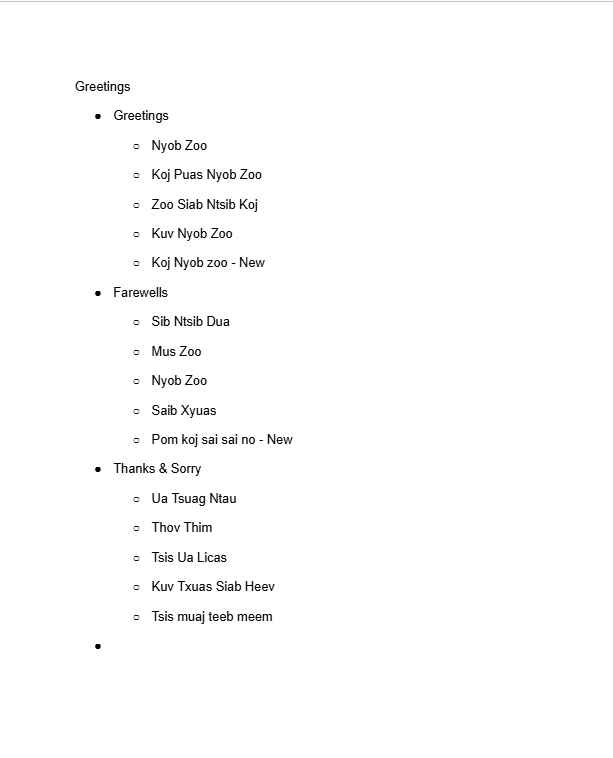
Then after that, need to implement lessons specifically related to Hmong grammar concepts.
check my original blog for this logic to understand.
But yeah, that's basically it.
Audio implementation
I plan on introducing the audio in wav, that way my tone scoring engine works well with them (see original speaking module blog to understand why).
300 fucking words, not even mentioning the lessons.
Conclusion
I worked tireless to bring my vision to life, and I'm really proud of myself for implementing this - after I finish the audio, and write some stories for the reading section, I'm going to release the app to the playstore.
I am hella excited and proud of myself, because I've built this app, and love the way it's going.
Anyways, thanks for reading.
Best,
- devv